Showing posts with label TentMail. Show all posts
Showing posts with label TentMail. Show all posts
Wednesday, June 2, 2010
Can I reply to TentMail over email?
Though you can have an email notification sent to you when you receive new TentMail, you cannot respond to TentMail through email. Copies of your Tent Mail are sent from our system address (service- bounces@bigtent.com). If you wish to reply, please click the link included in your the notification mesasge to respond on BigTent.

How can I contact members or leaders of my group individually?
While BigTent offers the Forums and News features to allow you to communicate with many or all group members simultaneously, at times you may want to send a private message to your group's leaders or to a fellow group member. For this purpose, BigTent offers a private messaging feature, calle TentMail. You can send TentMail to any group member or leader who is registered with your group on BigTent.
You have three different options to send a TentMail message.
OPTION 1: Go to my bigtent > tentmail and click "Write TentMail." Enter the name, screenname, or email address of the recipient in the "To" box and wait for a list of matching group members to appear. Click the name of the desired member, enter your subject and message, and click "Send."
OPTION 2: Visit a member's profile page. You can access a member's profile page by clicking on his or her screenname from the member list, the "New Members" area of the "what's new" page, or from any page where the member has entered content (e.g., the forums or reviews areas). Once on the member's profile, click "Send TentMail." Enter your subject and message and click "Send."
OPTION 3: Contact a group leader using TentMail directly from the "Leaders" section of the "about" page. Simply navigate to my groups > [group name] > about. There, if your group has listed any leaders, you will see group leaders and their contact information. Click on the name or screenname of the leader to view that leader's profile. Then compose your TentMail message as explained in option 2, above.
You have three different options to send a TentMail message.
OPTION 1: Go to my bigtent > tentmail and click "Write TentMail." Enter the name, screenname, or email address of the recipient in the "To" box and wait for a list of matching group members to appear. Click the name of the desired member, enter your subject and message, and click "Send."
OPTION 2: Visit a member's profile page. You can access a member's profile page by clicking on his or her screenname from the member list, the "New Members" area of the "what's new" page, or from any page where the member has entered content (e.g., the forums or reviews areas). Once on the member's profile, click "Send TentMail." Enter your subject and message and click "Send."
OPTION 3: Contact a group leader using TentMail directly from the "Leaders" section of the "about" page. Simply navigate to my groups > [group name] > about. There, if your group has listed any leaders, you will see group leaders and their contact information. Click on the name or screenname of the leader to view that leader's profile. Then compose your TentMail message as explained in option 2, above.
Overview: TentMail
TentMail is BigTent's internal message system. TentMail allows you to send a message to other group members without having to use your email. Every BigTent user has access to TentMail and can send to and receive messages from groups members registered on BigTent. To learn how to send a TentMail message, see our FAQ here: How can I contact members or leaders of my group individually?

How will I know when I have a new TentMail?
* You will see an alert on the "my bigtent" page.
* You will see a new message in your TentMail inbox, located at my bigtent > tentmail.
* Click on a message to view its contents and to reply to or archive the message.
* You can also easily configure your settings to get emailed notifications of new TentMail. To receive copies of new Tent Mail in your email inbox, visit settings > email options > personal notifications and check the appropriate box.
Can I reply to a TentMail from my email inbox?
You will need to come online to reply to TentMail. You can click on the link in your email notification to be taken directly to the message.
Can I forward TentMail to other group members?
At this time, you cannot forward your TentMail messages to other group members.
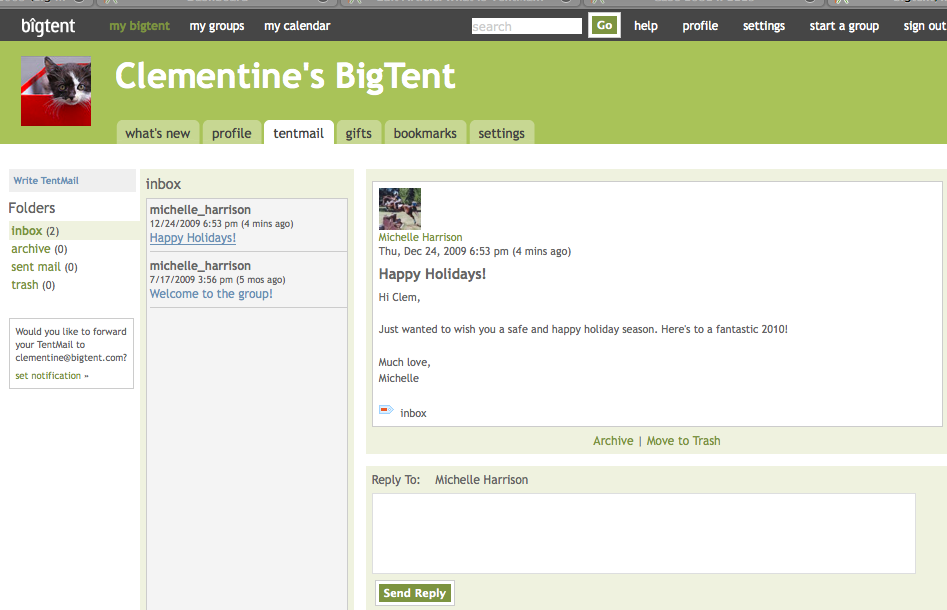
How will I know when I have a new TentMail?
* You will see an alert on the "my bigtent" page.
* You will see a new message in your TentMail inbox, located at my bigtent > tentmail.
* Click on a message to view its contents and to reply to or archive the message.
* You can also easily configure your settings to get emailed notifications of new TentMail. To receive copies of new Tent Mail in your email inbox, visit settings > email options > personal notifications and check the appropriate box.
Can I reply to a TentMail from my email inbox?
You will need to come online to reply to TentMail. You can click on the link in your email notification to be taken directly to the message.
Can I forward TentMail to other group members?
At this time, you cannot forward your TentMail messages to other group members.

Copyright © Big Tent 101 and MICAH Homeschool Support Group and Cooperative
Design and Layout by Wandaring June Designs.
Blogger Theme by BloggerThemes
Sponsored by Busy Buzz Blogging